Guide
How to write a monthly client report for paid ads
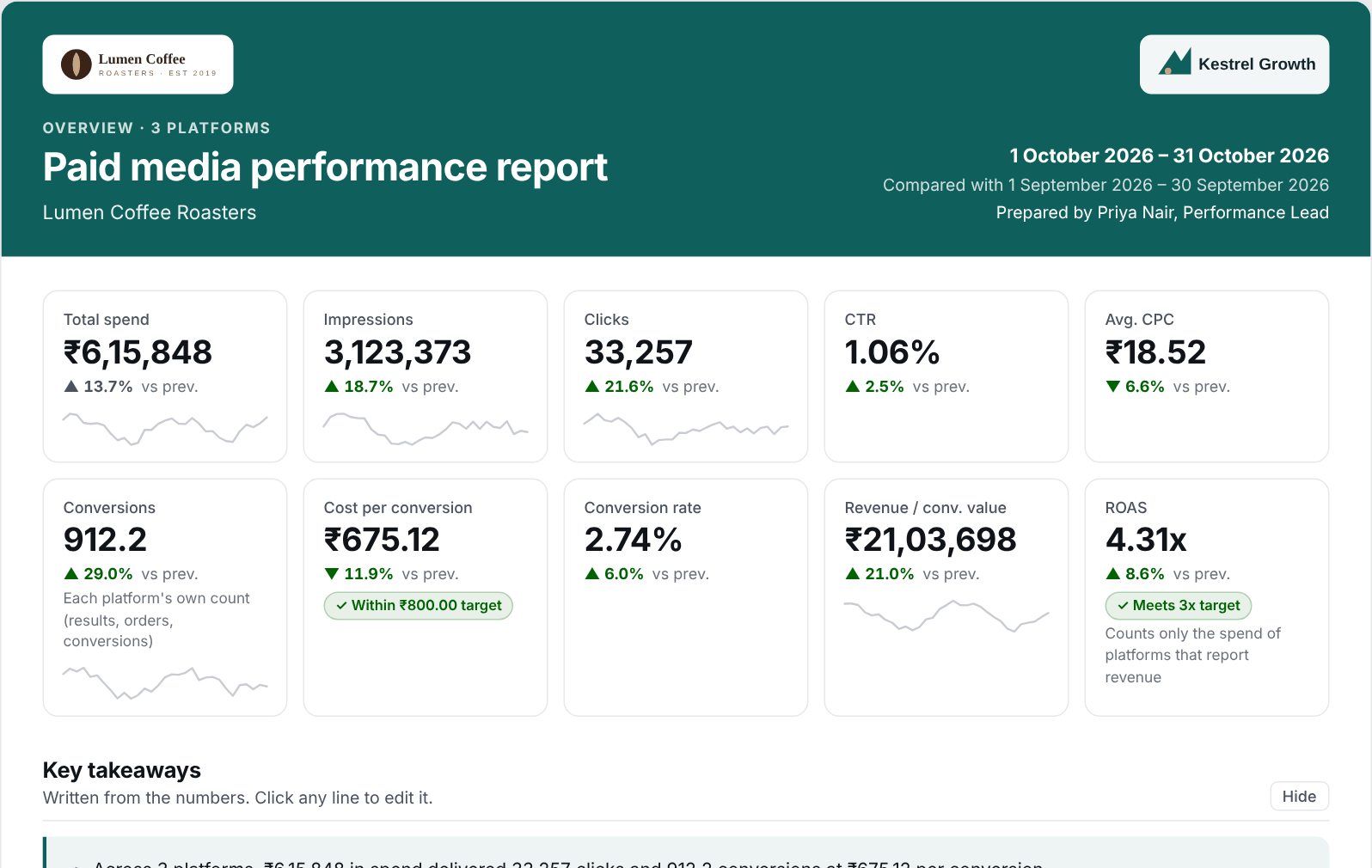
A good monthly report answers three questions for the client: what did we spend, what did we get, and what happens next. This is the process agencies use to build one in under an hour, or in five minutes with Recapora.
Step 1: Export the data from each platform
For each ad platform, export a campaign table for the month with a daily breakdown so you can show trends. See the export steps for Google Ads, Meta Ads, LinkedIn Ads, Amazon Ads and 20 other platforms. Export the previous month too, for comparison.
Step 2: Put the overview first
Clients read the first page and skim the rest. Open with total spend, results (purchases or leads), cost per result, revenue and ROAS across all platforms, each with the change versus last month. If you sell online, add MER (blended ROAS) to avoid double counting between platforms.
Step 3: One page per platform
For each platform show spend, impressions, clicks, CTR, CPC, conversions, CPA and ROAS, a daily trend chart, and the top and bottom campaigns. Keep each platform's own metric names so the client recognises them.
Step 4: Write three to five takeaways
Numbers without words get ignored. Write short, specific points: what improved and why, what got worse and what you are doing about it, and one recommendation with an expected result. For example: "Meta CPA fell 18% after we paused the two weakest ads; we will move ₹20,000 from search to the best Meta ad set next month."
Step 5: Add budget pacing and next month's plan
Show spend against budget (budget pacing) and a short plan for next month. This turns the report from a history lesson into a decision document.
Step 6: Brand it and send it
Add your logo, the client's logo and their colours, export a PDF, and send it with a short email that repeats the top takeaway. Use our client report email templates.
Recapora does steps 2 to 6 automatically from your exports: see a sample report.
How it works
- Export a table from each ad platform as CSV or Excel. Export guides for 22 platforms.
- Drop the files into Recapora. Platforms, columns, currency and dates are detected for you.
- Add your logo, your client's logo and colours, check the takeaways and download.
Questions
How long should a monthly client report be?
Usually 4 to 8 pages: a cover, an overview, one page per platform, takeaways and next steps. Clients rarely read more.
What should a monthly PPC report include?
Spend, results, cost per result, revenue and ROAS with change versus last month, a page per platform with trends and top campaigns, written takeaways, budget pacing and next month's plan.
How often should I send client reports?
Monthly is standard. Add a short weekly update for large budgets or during launches and sales.
Related: Negative keywords for Google Ads · UTM parameters for Google and Meta ads · What is a good CTR? · Zepto ads guide · Flipkart ads guide · Meta ads report in Google Sheets · Google Ads reporting tools · How to calculate ROAS · All articles