White-label reporting
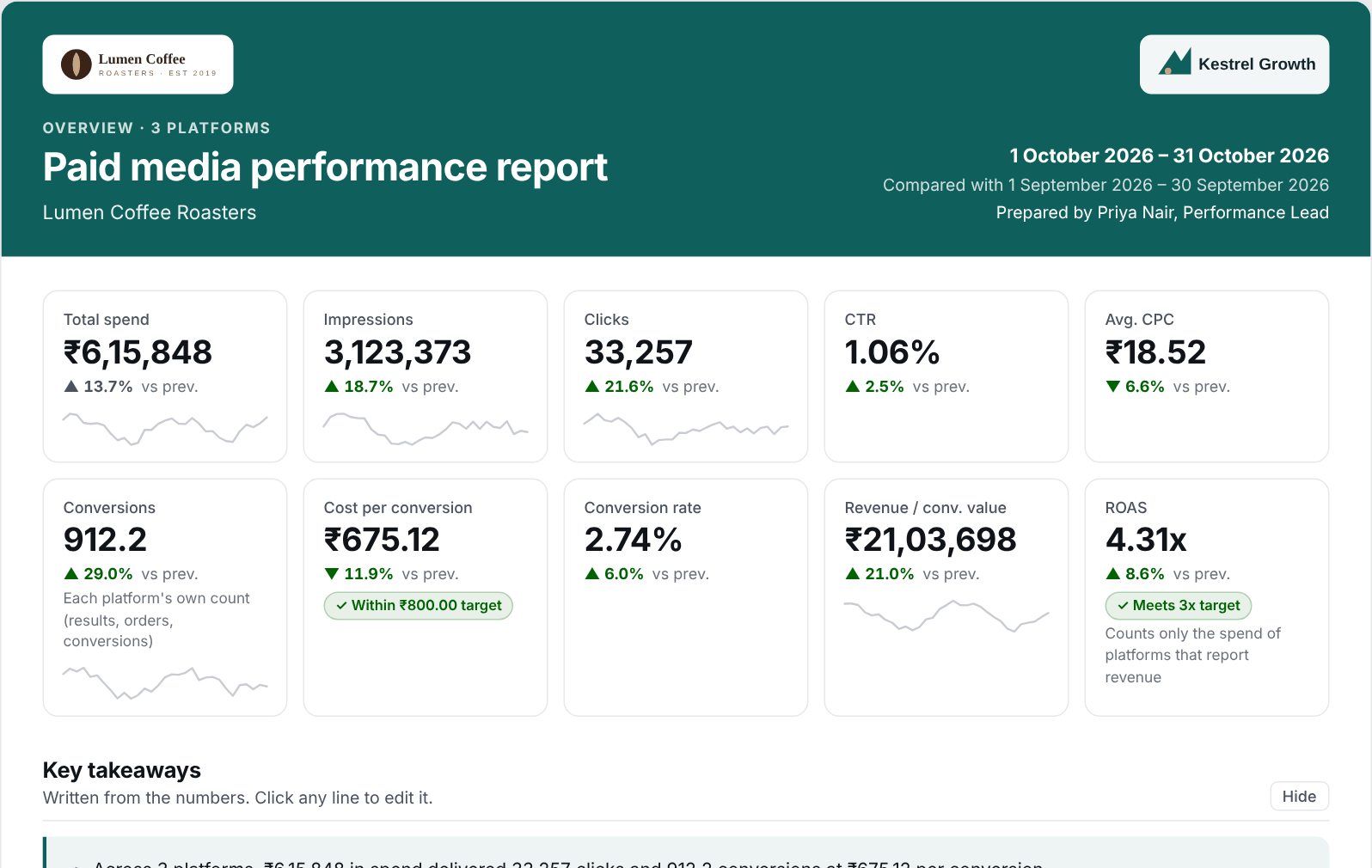
White-label ad reports your clients will think you built
Put your agency's name on every report: your logo, your client's logo, your colours and font, and no third-party branding. Recapora builds it from the platform exports you already download.
What you can brand
- Agency logo and client logo on the cover and every page.
- Brand colour and heading font across charts and tables.
- A cover photo per client.
- No "Made with" mark on paid plans.
- Your own written takeaways, edited before you send.
How agencies use it
- Save each client once with their logo and colours.
- Each month, drop in that client's Google, Meta and other exports.
- Check the takeaways, download the report file or PDF, and send it from your own email.
How it works
- Export a table from each ad platform as CSV or Excel. Export guides for 22 platforms.
- Drop the files into Recapora. Platforms, columns, currency and dates are detected for you.
- Add your logo, your client's logo and colours, check the takeaways and download.
Questions
Will my client see Recapora anywhere?
Not on paid plans. The report carries only your branding and your client's.
Can I white-label reports for many clients?
Yes. Pro covers 25 clients and Agency is unlimited, each with its own saved branding.
Related: How to calculate ROAS · Meta ads ROAS goal · Looker Studio alternatives · Blinkit ads guide · What is a good ROAS? · How to read a Google Ads report · Meta ads report template · Google Ads report template (Excel) · All articles